项目开发随笔 v1.0
项目开发随笔 v1.0
Github仓库
https://github.com/Frees-Ling/Pipeline-inspection
一键安装Vscode Ubuntu
sudo snap install code --classic安装完Vscode之后一定一定要检查是否有自动保存,特别是针对项目级别工程文件,要不然你只能是对空文件编译
配置Git及密钥
#配置Git用户信息
git config --global user.name "xxx"
git config --global user,email "xx@xx.com"
#配置密钥
ssh-keygen -t rsa -b 4096 -C "xx@xx.com"   #这里会生成密钥
cat ~/.ssh/id_rsa.pub #这里会输出密钥内容,把这个复制粘贴到代码平台的SSH配置里
配置密钥是为了更好的连接和传输代码(SSH)
#全部搞完之后,进行检查
ssh -T git@github.com  #后缀不唯一,这里以GitHub为例
Ubuntu20.04.x LTS 配置C/C++环境
本教程仅供配置C/C++所用,主要用到的工具均为目前常用工具,需要完整的Ubuntu系统(不可以是试用版本)
#主要安装
clang
gdb
g++
gcc
#打开终端
sudo apt update
sudo apt install build-essential
#验证
gcc --version
g++ --version
#如果有版本号出现即为成功,可以进行下一步
sudo apt install gdb
#验证
gdb --version
#验证结果同上
sudo apt install clang
sudo apt install cmake
#这里如果出现无法安装,是因为软件源错误,解决方法如下
sudo cp /etc/apt/sources.list /etc/apt/sources.list.bak #备份
#换源
deb http://archive.ubuntu.com/ubuntu focal main restricted universe multiverse
deb http://archive.ubuntu.com/ubuntu focal-updates main restricted universe multiverse
deb http://archive.ubuntu.com/ubuntu focal-security main restricted universe multiverse
#随后执行如下命令
sudo apt update
sudo apt install clang
#验证
clang --version
cmake --version
#备用方案(可选)
sudo apt install build-essential clang gdb cmake ninja-buildROS系统安装
注意: 本次管道巡检所使用的ROS只能装在Ubuntu20.x上,Ubuntu22.x以上只能安装ROS2
#更新系统
sudo apt update
sudo apt upgrade

#安装工具链
sudo apt install curl gnupg lsb-release

#下载ROS公钥
sudo mkdir -p /usr/share/keyrings
curl -sSL https://raw.githubusercontent.com/ros/rosdistro/master/ros.asc \
    | sudo gpg --dearmor -o /usr/share/keyrings/ros-archive-keyring.gpg

#添加ROS1 Noetic源
echo "deb [arch=$(dpkg --print-architecture) signed-by=/usr/share/keyrings/ros-archive-keyring.gpg] \
http://packages.ros.org/ros/ubuntu $(lsb_release -sc) main" \
| sudo tee /etc/apt/sources.list.d/ros-latest.list > /dev/null

#更新软件列表
sudo apt update

#进行安装
sudo apt install ros-noetic-desktop-full #完整版
sudo apt install ros-noetic-ros-base #核心版,仅有ROS

#配置环境变量
echo "source /opt/ros/noetic/setup.bash" >> ~/.bashrc
source ~/.bashrc

#安装依赖
sudo apt install python3-rosdep
sudo rosdep init
rosdep update

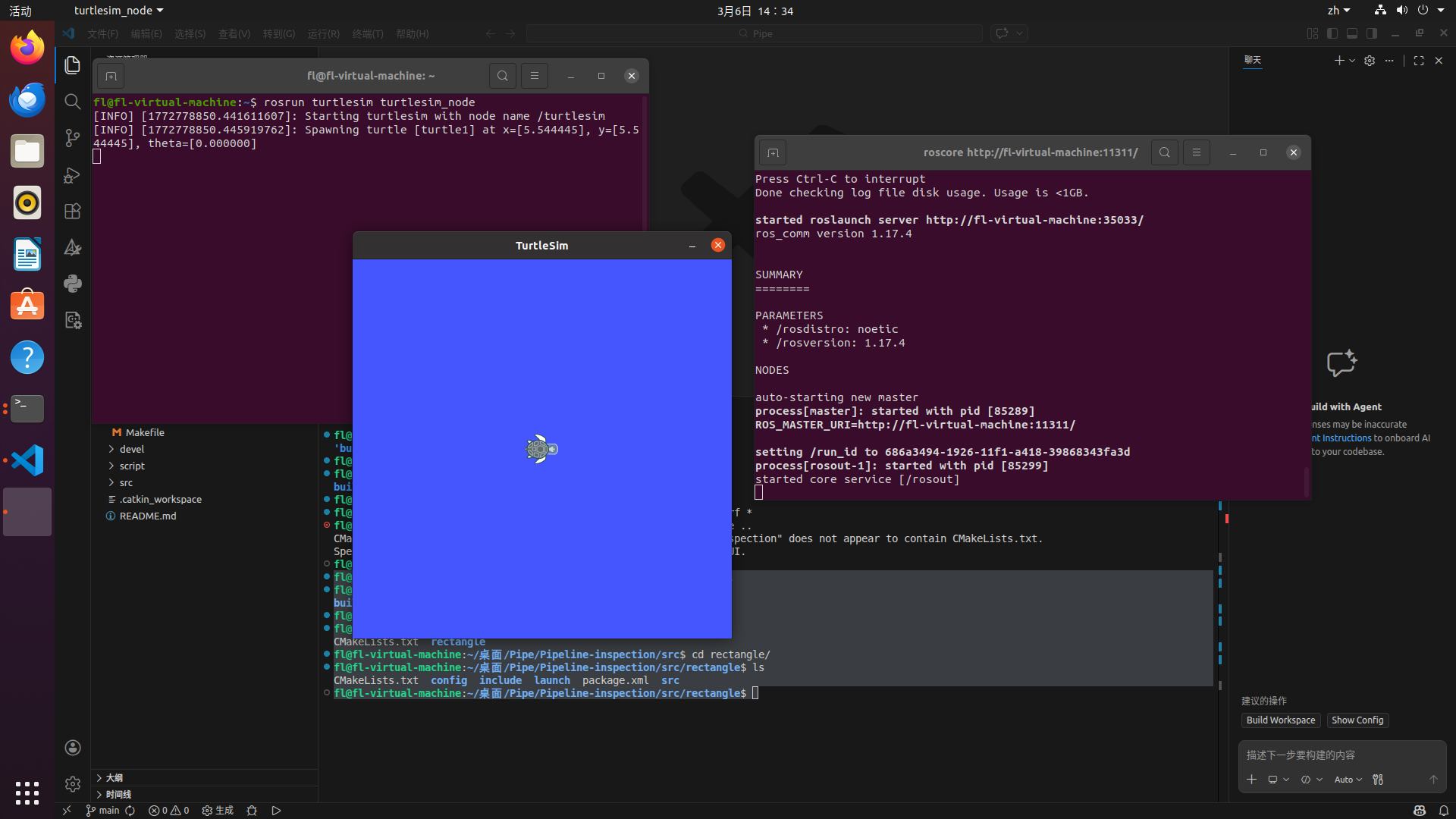
#分别开端口测试是否成功
roscore
rosrun turtlesim turtlesim_node
如下图即为成功
管道巡检代码复刻(足球无人机)
如果只是简单的进行catkin make是不行的,会报如下错误
fl@fl-virtual-machine:~/桌面/Pipe/Pipeline-inspection$ catkin_make
Base path: /home/fl/桌面/Pipe/Pipeline-inspection
Source space: /home/fl/桌面/Pipe/Pipeline-inspection/src
Build space: /home/fl/桌面/Pipe/Pipeline-inspection/build
Devel space: /home/fl/桌面/Pipe/Pipeline-inspection/devel
Install space: /home/fl/桌面/Pipe/Pipeline-inspection/install
####

## Running command: "cmake /home/fl/桌面/Pipe/Pipeline-inspection/src -DCATKIN_DEVEL_PREFIX=/home/fl/桌面/Pipe/Pipeline-inspection/devel -DCMAKE_INSTALL_PREFIX=/home/fl/桌面/Pipe/Pipeline-inspection/install -G Unix Makefiles" in "/home/fl/桌面/Pipe/Pipeline-inspection/build"

####
-- The C compiler identification is GNU 9.4.0
-- The CXX compiler identification is GNU 9.4.0
-- Check for working C compiler: /usr/bin/cc
-- Check for working C compiler: /usr/bin/cc -- works
-- Detecting C compiler ABI info
-- Detecting C compiler ABI info - done
-- Detecting C compile features
-- Detecting C compile features - done
-- Check for working CXX compiler: /usr/bin/c++
-- Check for working CXX compiler: /usr/bin/c++ -- works
-- Detecting CXX compiler ABI info
-- Detecting CXX compiler ABI info - done
-- Detecting CXX compile features
-- Detecting CXX compile features - done
-- Using CATKIN_DEVEL_PREFIX: /home/fl/桌面/Pipe/Pipeline-inspection/devel
-- Using CMAKE_PREFIX_PATH: /opt/ros/noetic
-- This workspace overlays: /opt/ros/noetic
-- Found PythonInterp: /usr/bin/python3 (found suitable version "3.8.10", minimum required is "3")
-- Using PYTHON_EXECUTABLE: /usr/bin/python3
-- Using Debian Python package layout
-- Found PY_em: /usr/lib/python3/dist-packages/em.py
-- Using empy: /usr/lib/python3/dist-packages/em.py
-- Using CATKIN_ENABLE_TESTING: ON
-- Call enable_testing()
-- Using CATKIN_TEST_RESULTS_DIR: /home/fl/桌面/Pipe/Pipeline-inspection/build/test_results
-- Forcing gtest/gmock from source, though one was otherwise available.
-- Found gtest sources under '/usr/src/googletest': gtests will be built
-- Found gmock sources under '/usr/src/googletest': gmock will be built
-- Found PythonInterp: /usr/bin/python3 (found version "3.8.10")
-- Found Threads: TRUE
-- Using Python nosetests: /usr/bin/nosetests3
-- catkin 0.8.12
-- BUILD_SHARED_LIBS is on
-- BUILD_SHARED_LIBS is on
-- ~~~~~~~~~~~~~~~~~~~~~~~~~~~~~~~~~~~~~~~~~~~~~~~~~
-- ~~  traversing 1 packages in topological order:
-- ~~  - rectangle
-- ~~~~~~~~~~~~~~~~~~~~~~~~~~~~~~~~~~~~~~~~~~~~~~~~~
-- +++ processing catkin package: 'rectangle'
-- ==> add_subdirectory(rectangle)
-- Could NOT find mavros (missing: mavros_DIR)
-- Could not find the required component 'mavros'. The following CMake error indicates that you either need to install the package with the same name or change your environment so that it can be found.
CMake Error at /opt/ros/noetic/share/catkin/cmake/catkinConfig.cmake:83 (find_package):
  Could not find a package configuration file provided by "mavros" with any
  of the following names:

    mavrosConfig.cmake
    mavros-config.cmake

  Add the installation prefix of "mavros" to CMAKE_PREFIX_PATH or set
  "mavros_DIR" to a directory containing one of the above files.  If "mavros"
  provides a separate development package or SDK, be sure it has been
  installed.
Call Stack (most recent call first):
  rectangle/CMakeLists.txt:10 (find_package)

-- Configuring incomplete, errors occurred!
See also "/home/fl/桌面/Pipe/Pipeline-inspection/build/CMakeFiles/CMakeOutput.log".
See also "/home/fl/桌面/Pipe/Pipeline-inspection/build/CMakeFiles/CMakeError.log".
Invoking "cmake" failed那么错误报告很明显,缺失mavros这个包,我们需要进行安装
如下是解决方案
# 更新软件源列表

sudo apt update

# 修复可能的依赖损坏

sudo apt --fix-missing install

# 安装 mavros 核心包

sudo apt install ros-noetic-mavros ros-noetic-mavros-extras

# 安装 mavros 的地理数据(用于 GPS 等功能,必须装)

wget https://raw.githubusercontent.com/mavlink/mavros/master/mavros/scripts/install_geographiclib_datasets.sh
chmod +x install_geographiclib_datasets.sh
sudo ./install_geographiclib_datasets.sh

# 删除临时脚本(可选)

rm install_geographiclib_datasets.sh

#如果报如下错误
fl@fl-virtual-machine:~/桌面/Pipe/Pipeline-inspection$ wget https://raw.githubusercontent.com/mavlink/mavros/master/mavros/scripts/install_geographiclib_datasets.sh
--2026-03-06 14:49:11--  https://raw.githubusercontent.com/mavlink/mavros/master/mavros/scripts/install_geographiclib_datasets.sh
正在解析主机 raw.githubusercontent.com (raw.githubusercontent.com)... 185.199.110.133, 185.199.109.133, 185.199.108.133, ...
正在连接 raw.githubusercontent.com (raw.githubusercontent.com)|185.199.110.133|:443... 已连接。
已发出 HTTP 请求,正在等待回应... 读取文件头错误 (连接被对方重设)。
重试中。

--2026-03-06 14:49:31--  (尝试次数: 2)  https://raw.githubusercontent.com/mavlink/mavros/master/mavros/scripts/install_geographiclib_datasets.sh
正在连接 raw.githubusercontent.com (raw.githubusercontent.com)|185.199.110.133|:443... 已连接。
已发出 HTTP 请求,正在等待回应... 读取文件头错误 (连接被对方重设)。
重试中。

--2026-03-06 14:49:53--  (尝试次数: 3)  https://raw.githubusercontent.com/mavlink/mavros/master/mavros/scripts/install_geographiclib_datasets.sh
正在连接 raw.githubusercontent.com (raw.githubusercontent.com)|185.199.110.133|:443...

#那么就是网络问题了

#如果下载失败,可进行如下操作
sudo apt install geographiclib-tools
sudo geographiclib-get-geoids egm96-15

#验证

# 查找 mavros 包的位置

rospack find mavros

# 预期输出(类似):
# /opt/ros/noetic/share/mavros
那么解决了包缺失,我们可以很顺利地进行构建,如下为成功构建
fl@fl-virtual-machine:~/桌面/Pipe/Pipeline-inspection$ catkin_make
Base path: /home/fl/桌面/Pipe/Pipeline-inspection
Source space: /home/fl/桌面/Pipe/Pipeline-inspection/src
Build space: /home/fl/桌面/Pipe/Pipeline-inspection/build
Devel space: /home/fl/桌面/Pipe/Pipeline-inspection/devel
Install space: /home/fl/桌面/Pipe/Pipeline-inspection/install
####

## Running command: "make cmake_check_build_system" in "/home/fl/桌面/Pipe/Pipeline-inspection/build"

####
####

### Running command: "make -j8 -l8" in "/home/fl/桌面/Pipe/Pipeline-inspection/build"

####
Scanning dependencies of target mytest
Scanning dependencies of target detection
Scanning dependencies of target yaw_printer
Scanning dependencies of target cross_rectangle
[ 11%] Building CXX object rectangle/CMakeFiles/yaw_printer.dir/src/yaw_printer.cpp.o
[ 22%] Building CXX object rectangle/CMakeFiles/detection.dir/src/threshold_binary.cpp.o
[ 33%] Building CXX object rectangle/CMakeFiles/mytest.dir/src/test2.cpp.o
[ 44%] Building CXX object rectangle/CMakeFiles/cross_rectangle.dir/src/cross_rectangle.cpp.o
[ 55%] Building CXX object rectangle/CMakeFiles/cross_rectangle.dir/src/PID_controller.cpp.o
[100%] Linking CXX executable /home/fl/桌面/Pipe/Pipeline-inspection/devel/lib/rectangle/yaw_printer
[100%] Linking CXX executable /home/fl/桌面/Pipe/Pipeline-inspection/devel/lib/rectangle/cross_rectangle
[100%] Linking CXX executable /home/fl/桌面/Pipe/Pipeline-inspection/devel/lib/rectangle/mytest
[100%] Linking CXX executable /home/fl/桌面/Pipe/Pipeline-inspection/devel/lib/rectangle/detection
[100%] Built target yaw_printer
[100%] Built target mytest
[100%] Built target detection
[100%] Built target cross_rectangle
第三方库安装
Eigen(线性代数库)
sudo apt update
sudo apt install libeigen3-dev
安装完成后,头文件在 /usr/include/eigen3
OpenCV2
sudo apt install libopencv-dev=2.4.9+dfsg-1注意:Ubuntu 20.04 默认可能没有旧版 OpenCV2,需要自己编译,或者干脆用 OpenCV4,API 兼容性大部分没问题
OpenCV2 编译版
sudo apt install build-essential cmake git libgtk2.0-dev pkg-config libavcodec-dev libavformat-dev libswscale-dev
git clone https://github.com/opencv/opencv.git
cd opencv
git checkout 2.4
mkdir build && cd build
cmake ..
make -j$(nproc)
sudo make install
安装完成后,头文件在 /usr/include/opencv 和 /usr/include/opencv2
国内
git clone https://gitee.com/OpenCVChina/opencv.git
cd opencv
git checkout 2.4
mkdir build
cd build
cmake ..
make -j$(nproc)
sudo make install```
参见 —— 讲过同一件事的记录
CC
除特别注明外,本文采用 CC BY-NC-SA 4.0 协议。
CONVERSATION
回应与讨论
欢迎留下你的想法。评论由 GitHub Discussions 保存和管理。
评论框没有显示?可以直接前往 GitHub Discussions 参与讨论。